An Amazon Machine Image (AMI) is used to create virtual servers (Amazon Elastic Compute Cloud or EC2 instances) in the Amazon Web Services (AWS) environment. Different types of instances can be launched from a single AMI to support the hardware of the host computer used for the instance. With AMIs, it is faster and easier to set up an instance than with traditional software deployments as there is no manual set up, no configuration and no additional hardware.
AMIs can be created or acquired. Prebuilt AMIs can be found by searching AWS, the user community or the AWS marketplace. Custom AMIs can also be created by users or third-party providers (for example, from a vendor such as Aviatrix) to meet specific requirements. Custom AMIs can be kept private. They can also be shared or sold publicly.
The main component of an AMI is a read-only file system that is compressed, encrypted and stored in Amazon S3. AMIs include:
A template for the instance’s root volume, which typically contains an operating system*, application server, and applications
Permissions that restrict AMI instance launches to defined accounts
Public – launch permission granted to all AWS accounts
Explicit – launch permission only granted to specific accounts
Implicit – launch permission only granted for an AMI
A block device mapping that directs which volumes are attached to a launched instance
Once an AMI has been created and registered, it can be reused to launch multiple instances with the same configuration. Tags can be used to categorize and manage AMIs. When an AMI is no longer needed, it can be deregistered. A deregistered AMI cannot be used to launch new instances, but existing instances will remain active.
*Amazon EC2 currently (as of March 2018) supports a variety of operating systems, including Amazon Linux, Ubuntu, Windows Server, Red Hat Enterprise Linux, SUSE Linux Enterprise Server, Fedora, Debian, CentOS, Gentoo Linux, Oracle Linux, and FreeBSD.
Ingress vs. Why AMIs matter
AMIs are a core building block for scalable cloud operations because they allow you to:
Launch multiple EC2 instances with the same baseline configuration
Deploy faster with repeatable, predictable builds
Standardize OS and software versions across dev/test/prod
What’s inside an AMI (Amazon Machine Image)?
An AMI is primarily a read-only root file system stored in Amazon S3, and it includes:
Root volume template (commonly the OS + application components)
Launch permissions (who can use the AMI)
Public: usable by all AWS accounts
Explicit: usable only by specific accounts
Implicit: usable only by the AMI owner (private)
Block device mapping (which EBS volumes attach when the instance launches)
What are the Types of AMIs?
AMIs can be created or acquired depending on your requirements:
Prebuilt AMIs
Prebuilt AMIs are available from AWS, the community, or the AWS Marketplace. They’re useful when you want a known baseline quickly.
Custom AMIs
Custom AMIs are created by users or third-party providers (including vendors such as Aviatrix) to meet specific requirements. Custom AMIs can be private, shared with specific accounts, or published publicly.
AMI lifecycle: create, reuse, tag, and retire
Once an AMI is created and registered, it can be reused to launch multiple instances with the same configuration. Tags can help categorize and manage AMIs across environments. When an AMI is no longer needed, it can be deregistered. A deregistered AMI can’t be used to launch new instances, but existing instances keep running.
AMI Lifecycle at a Glance
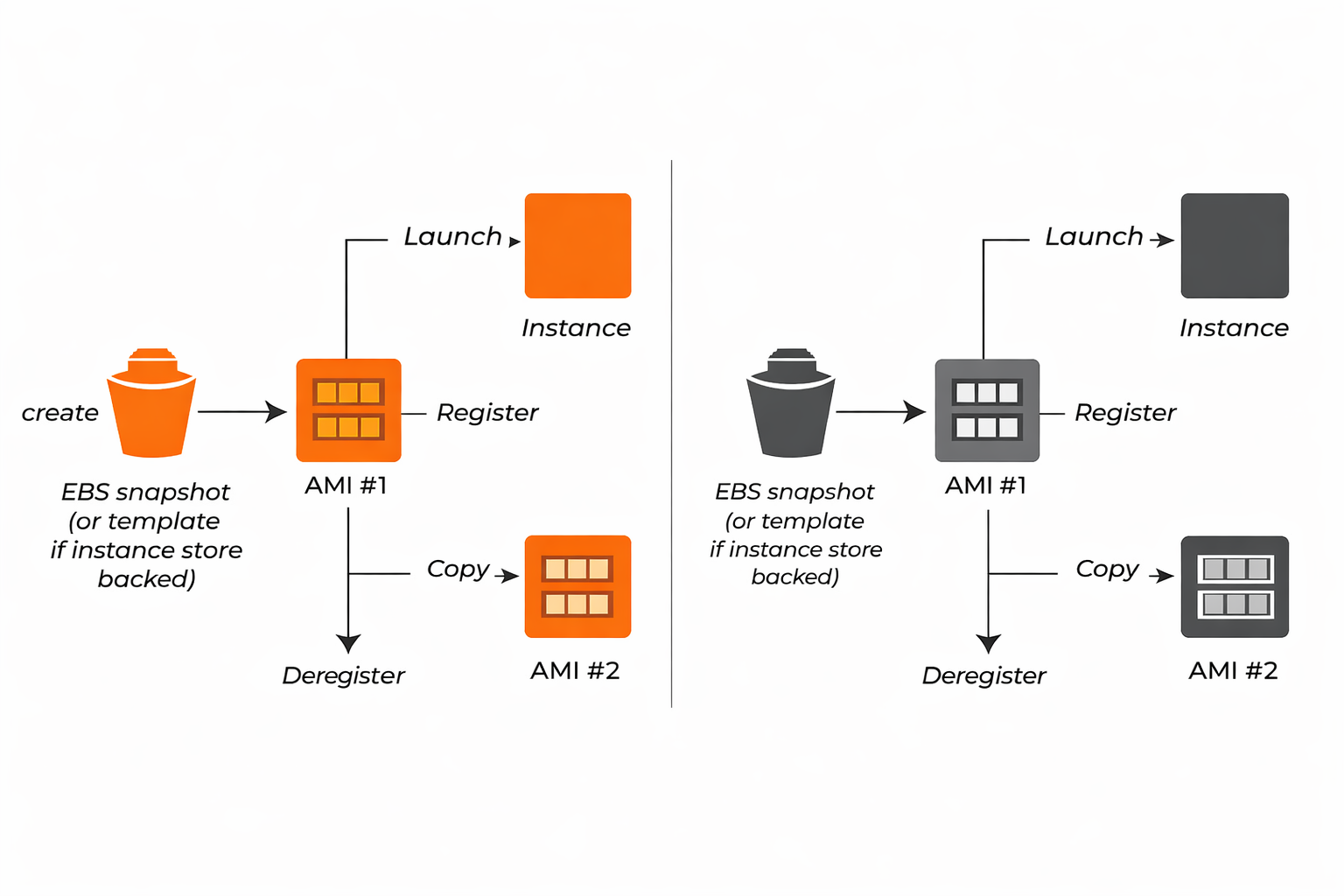
An AMI is a reusable blueprint for launching EC2 instances consistently. The flow begins with creating a snapshot of the instance’s root volume (or a template for instance-store backed images). After you register that snapshot as AMI #1, you can use it as a standardized source for deployment. From AMI #1, you can either launch an EC2 instance (repeatable provisioning), or copy the AMI to create AMI #2—commonly done to support a new region, share across accounts, or preserve a versioned “golden image.” When you deregister an AMI, it’s removed from the list of launchable images, which helps prevent accidental use of outdated baselines and supports lifecycle management.
Best practices for using AMIs
To keep AMIs secure and operationally consistent:
Standardize naming and tagging (owner, app, environment, version, patch date)
Use least-privilege launch permissions (avoid public AMIs unless there’s a clear reason)
Patch and rebuild regularly (treat AMIs as “golden images” that are versioned and refreshed)
Retire old AMIs to reduce security risk and prevent accidental use
Validate regions and account sharing so teams launch the intended image every time